
A low-friction routine
Four moments keep the list useful.
Add dated food while it is already in your hand
Capture the item name and printed date as groceries enter the fridge. Recording it later adds another task and makes forgotten packages more likely.
Verify the package before saving
Packages can show several dates or unfamiliar formats. Keep the original label visible and confirm the date yourself instead of trusting an automatic guess.
Keep the shortest time remaining at the top
A fridge inventory should answer one question quickly: what needs attention first? Sort by time remaining instead of making people scan a long alphabetical list.
Run a ten-minute weekly reset
Remove items that were eaten or discarded, add any dated packages you missed, and check that the use-first queue still matches what is in the fridge.
A lighter way to keep inventory
fridgiary turns confirmed package dates into a use-first queue.
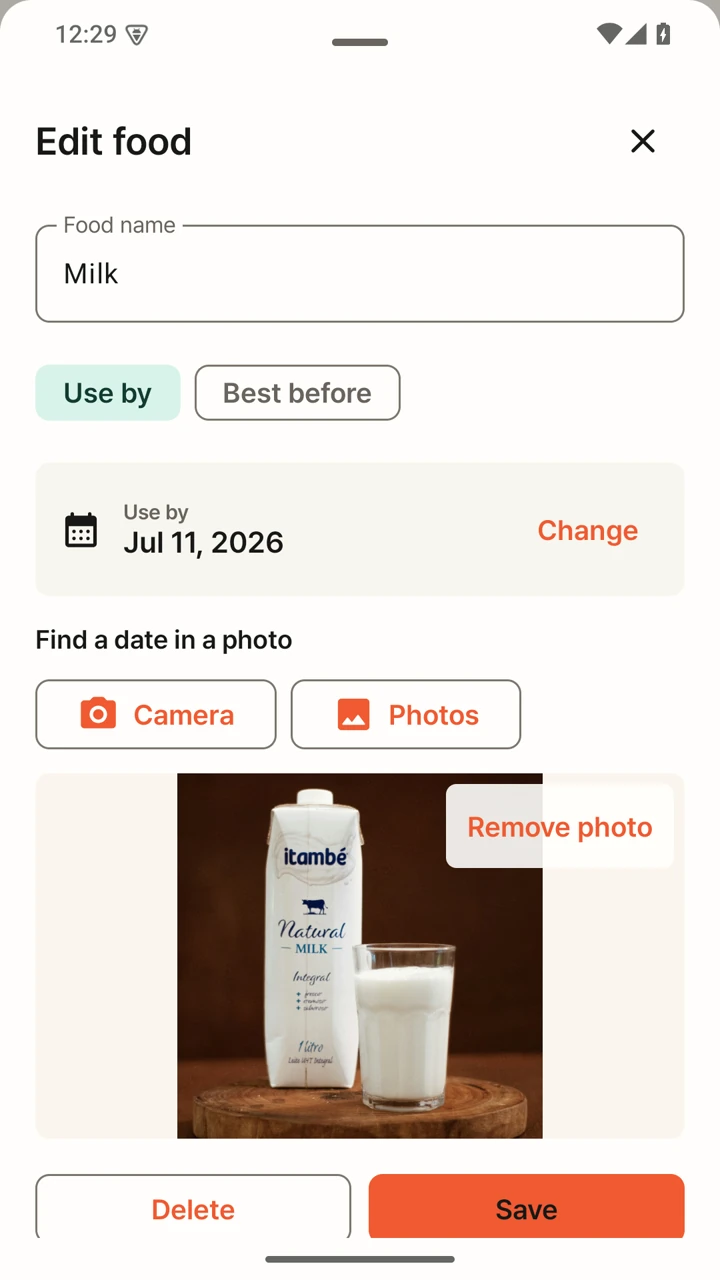
Take a package photo or enter an item manually, confirm the date, and keep food with less time remaining visible. The app stays focused on the decision in front of you instead of asking for a complete kitchen database.
- Start with a package photo or a short manual entry
- Confirm every recognized date before saving
- Close the loop when an item is eaten or discarded
- Keep item records and package photos on the Android device
Keep the boundary clear
An inventory can organize dates. It cannot confirm food safety.
Storage conditions, opened packages, damaged seals, local guidance, and the type of date label all matter. Follow the original package and official food-safety guidance for your location. A saved date or reminder is not a freshness guarantee.
Practical questions
Make the checklist small enough to repeat
Do I need to track every item in the fridge?
No. Start with dated packages and food you regularly forget. A smaller list that stays current is more useful than a complete inventory that is abandoned after one grocery trip.
What if a package shows more than one date?
Read the words beside each date and confirm which printed label you intend to remember. Manufacturing, packing, use-by, and best-before dates can mean different things. Do not save a date only because OCR found it first.
How often should I update the inventory?
Update it when dated food enters or leaves the fridge, then use a short weekly reset to catch missed packages. The goal is a trustworthy use-first queue, not constant administration.
Continue the routine
Use the original package as your source.
Android
Start with one dated package, not the whole fridge.
fridgiary is currently in Google Play closed testing.